

Your Zittle plan
Zittle is a subscription. Every new business starts with a 30-day free trial, with no card needed, and then picks a plan. Your plan covers your booking website and your dashboard. The platform fee on online bookings is separate.
Plans and prices
Section titled “Plans and prices”| Plan | Price | With 18% GST | Compared with Monthly |
|---|---|---|---|
| Monthly | ₹1,500 | ₹1,770 | |
| Quarterly | ₹4,000 | ₹4,720 | Save 11.11% |
| Yearly | ₹15,000 | ₹17,700 | Save 16.67%: 2 months free |
The plans differ only in how long they last. The longer the plan, the less you pay per month.
Choose or renew a plan
Section titled “Choose or renew a plan”Open the Subscription Plans window in any of these ways:
- Select Subscribe Now on the Subscription Expired banner.
- Select Renew Now on the Subscription Expiring Soon notification.
- Go to Subscriptions and select Get Another Subscription.
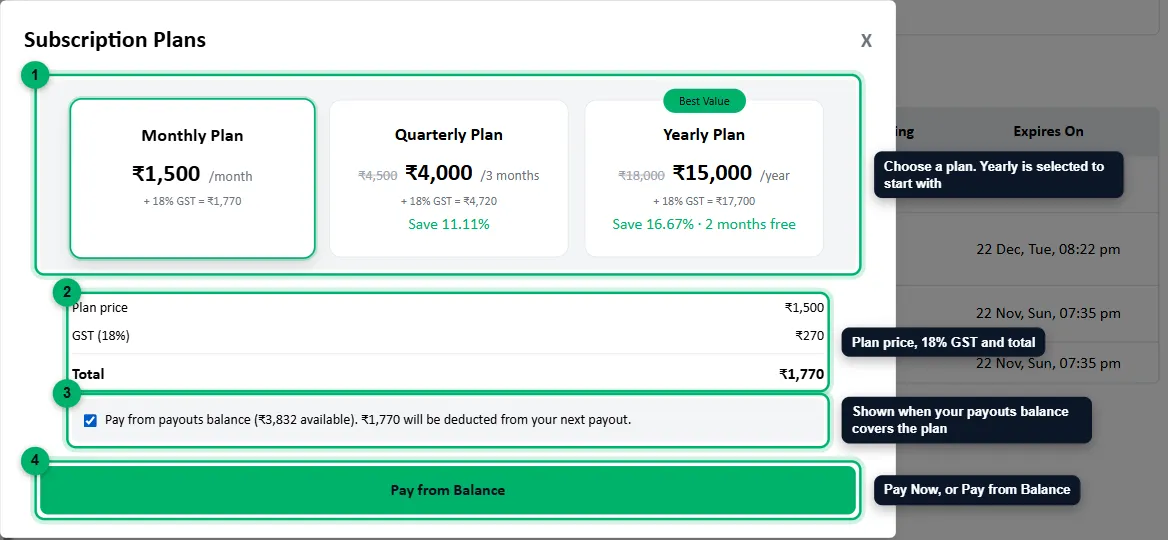
- The three plans. On the longer ones, what Monthly would cost for the same time is crossed out.
- The plan price, 18% GST and the total, after any coupon.
- Pay from payouts balance, shown when the money waiting in your payouts covers the whole price.
- Pay Now, or Pay from Balance if you ticked the box above.
-
Choose Monthly, Quarterly or Yearly. Yearly is selected to start with. The window shows the plan price, the 18% GST and the total.
-
If Zittle has given you a coupon for your plan, enter it and select Apply. The coupon field shows only when you have one to use.
-
Pay:
- Select Pay Now to pay online.
- Or, if your payouts balance covers the whole price, tick Pay from payouts balance and select Pay from Balance. The amount comes off your next Monday payout. You can also tick the box below it to renew this way automatically. See Auto-renew from your payouts.
If your business details don’t have a phone number yet, Zittle asks you to complete them first.
A plan you buy before your current one ends starts when the current one ends, so you never lose days by renewing early.
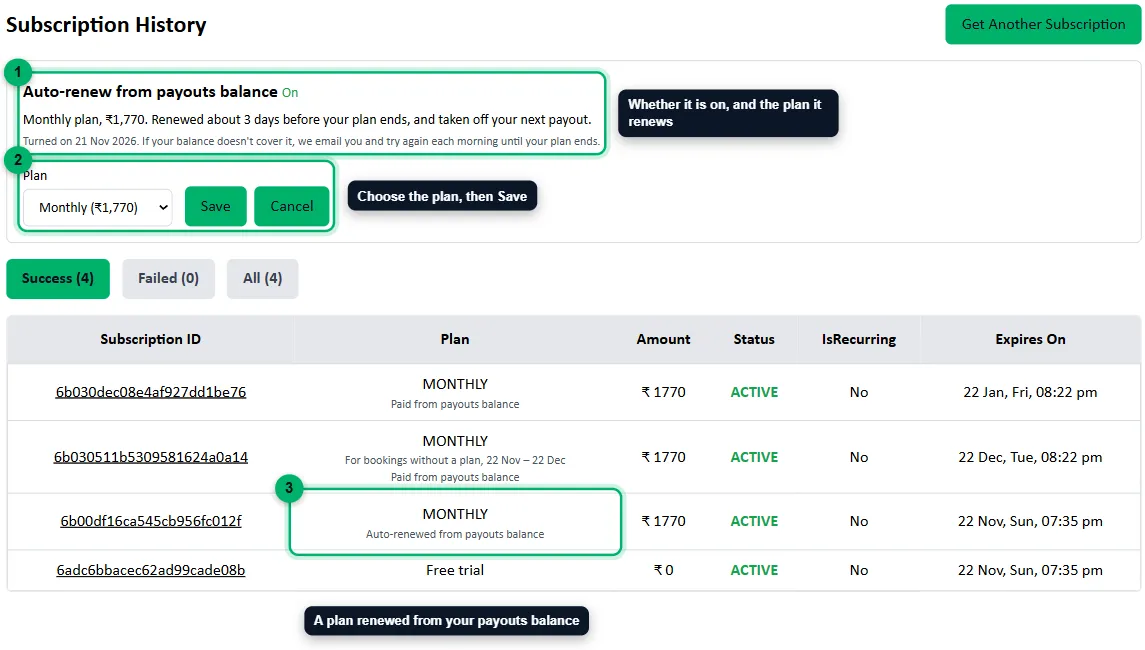
Your plans are listed on the Subscriptions page, with their status, price and end date. A plan paid from your payouts balance shows Paid from payouts balance, and one renewed automatically shows Auto-renewed from payouts balance.
Renewal reminders
Section titled “Renewal reminders”Zittle reminds you before your plan or free trial ends:
- In your dashboard, a Subscription Expiring Soon notification from 15 days before, with Renew Now.
- By email, 7 days, 3 days and 1 day before.
Auto-renew from your payouts
Section titled “Auto-renew from your payouts”Instead of renewing by hand, you can let Zittle renew your plan from the money waiting in your payouts.
-
Go to Subscriptions. On the Auto-renew from payouts balance card, select Turn On, or Change if it’s already on. The card shows whether auto-renew is on, the plan it renews and its price.
-
Choose the plan, add a coupon if you have one, and select Save.
-
A plan renewed this way is listed as Auto-renewed from payouts balance.
About 3 days before your plan ends, Zittle renews it and takes the amount off your next payout. If your balance doesn’t cover it yet, you get an email and Zittle tries again each morning until your plan ends. Select Turn Off to stop.
When your plan ends
Section titled “When your plan ends”If your plan or free trial ends without a renewal:
- A Subscription Expired banner appears in your dashboard, with Subscribe Now.
- Your website keeps taking bookings, so guests are never turned away. But online payments made while you have no plan are held, not paid out, until you pay for that time. See Bookings paid while you have no plan.
- You can’t add or change events, venues, dates, packages, coupons or your website details, or use the Bulk Editor, until you renew. An AI assistant can still show you your events and bookings, but can’t make changes either.
- You can still see your bookings and payments, change your bank details and set up auto-renew.
- While payouts are waiting and you have no plan, Zittle emails you each Friday.