

Add your policies
Your website shows three policies: terms and conditions, a cancellation policy and a privacy policy. Zittle fills each one in with starter text, so you only need to review it and make it match how you run your events.
The policies are on the Website Details page, below the FAQs.
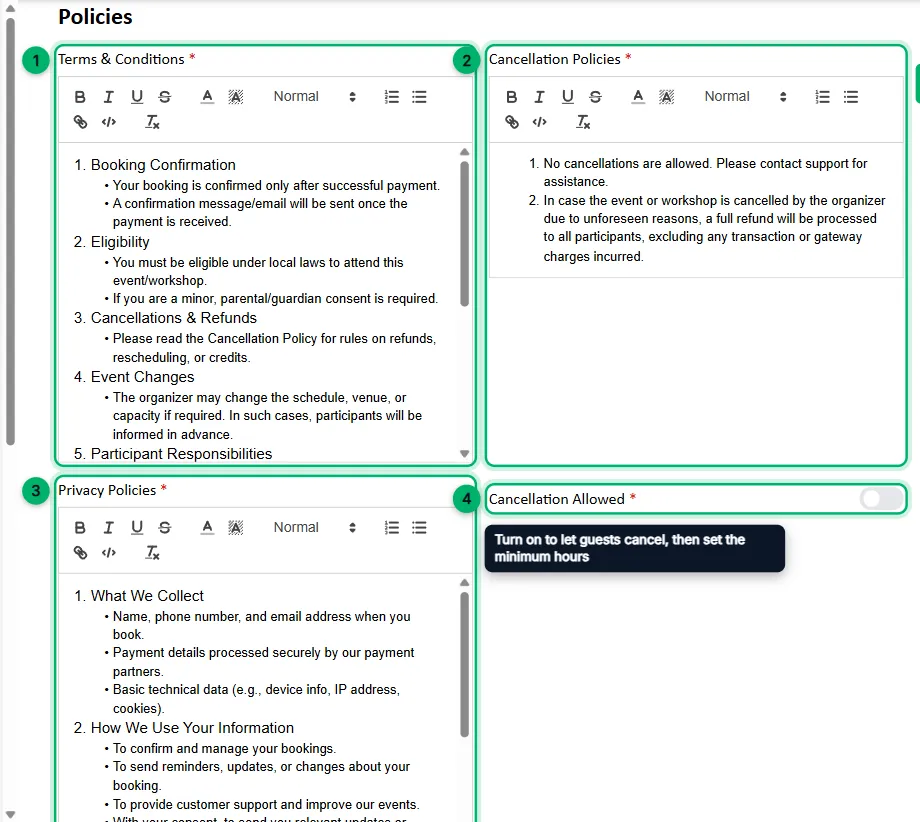
-
Terms & Conditions: read the starter text and edit anything that doesn’t fit your business. The toolbar above each box lets you format text, add lists and add links.
-
Cancellation Policies: the starter text says cancellations aren’t allowed. Rewrite it if you accept cancellations or offer refunds, so it says exactly what guests can expect.
-
Privacy Policies: review the starter text that explains what guest information you collect and how you use it.
-
Cancellation Allowed: turn this on to let guests cancel their own bookings. Then enter a Minimum Time (In Hours): guests can cancel up to that many hours before the session starts.
-
Select Save Changes at the top of the page.
Only bookings paid online can be cancelled by guests.