Track where bookings come from
When you share an event in several places, a campaign link shows which of them actually brings bookings. It’s your normal event link with a tag on the end. When a guest books after opening it, the booking remembers the tag.
Make a campaign link
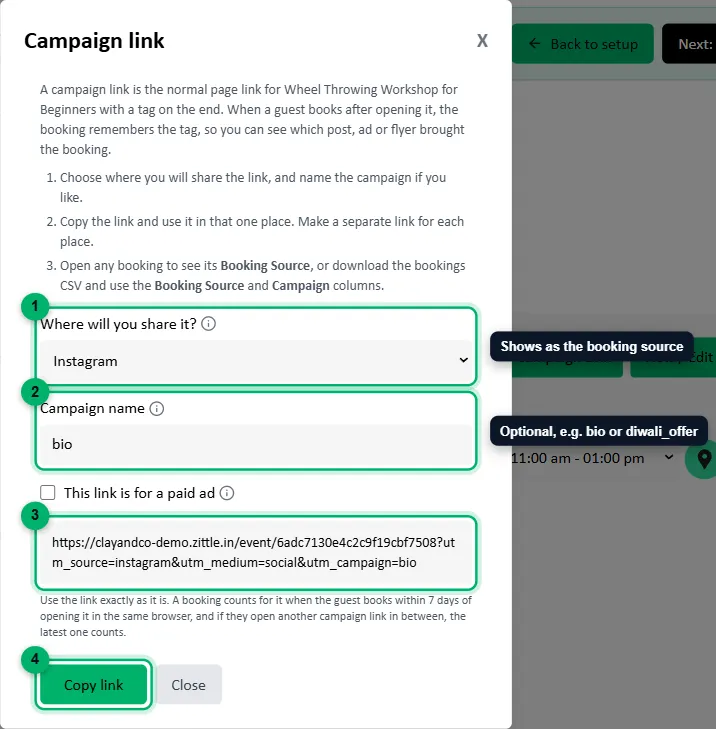
Section titled “Make a campaign link”In your dashboard, go to Products and select Campaign Link on the event.

-
Where will you share it?: the place guests will tap the link: Instagram, Facebook, WhatsApp, Google, Flyer or QR code, or Somewhere else. For Somewhere else, enter a short Name of the place, such as
newsletterorpartner_gym. This is what shows as the booking’s source. -
Campaign name (optional): tells links apart when you share several in the same place, such as
bio,story_12octordiwali_offer. Spaces become underscores. -
Your link appears here. Tick This link is for a paid ad if you’re paying for the ad that uses it. That only changes how Google Analytics groups the visit, not what you see in Zittle.
-
Select Copy link, and use it in that one place.
Make a separate link for each place. For example, one for your Instagram bio, one for stories, and one for the QR code on your flyer.
See the results
Section titled “See the results”- Open any booking under Bookings to see its Booking Source, such as
instagram · bio. - Or download your bookings as a CSV from Bookings and use the Booking Source and Campaign columns to compare places.
Bookings that didn’t come from a campaign link show how they were made instead: Website, the WhatsApp or Instagram chatbot, or the source you chose for an offline ticket.